My approach to GTD - processing
2025-12-15 06:23
This is the second part on my loose approach to GTD. I already covered the capture stage. Here I'll discuss the process stages.
"Processing" is what I call clarifying and organising my "stuff" (things I possibly need to take action on). My stuff has already been captured in my trusted inboxes:
- my todo.md file
- email inboxes
- physical mail on pile on dining table
- text messages
To clarify I basically run through what it says in the book, asking the questions as I go through the list, piles, emails or messages:
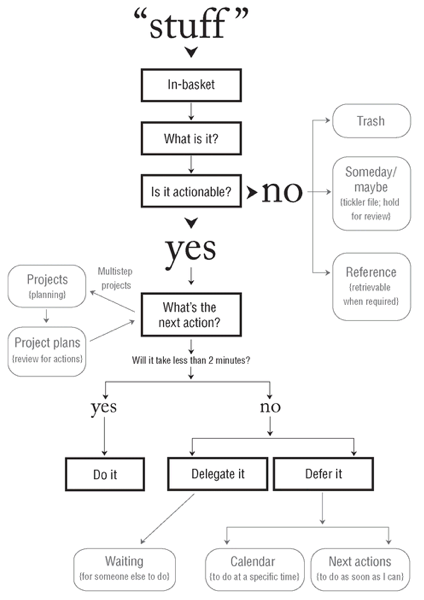
Then I'll organise. Here's a look at the relevant folder structure I'm using digitally:
├─ 01-Projects/
   ├─ current/
      ├─ 20251114-example-project
         ├─ +example-project.md
   ├─ later/
   ├─ someday-maybe/
   ├─ waiting-for/
├─ 02-Areas/
   ├─ notes/
      ├─ 01-Projects/ ([symlink](https://wiki.debian.org/SymLink))
      ├─ people/
         ├─ @person.md
      ├─ todo.md
      ├─ some-example-note.md
├─ 03-Reference/
├─ 04-Archive/
At the highest level I'm following the PARA method. Folders under 01-Projects are specific to GTD and I'll address them later as part of the reflect stage.
Non-actionable items
If it's trash, I'll delete it (digital) or recycle/bin it (physical).
If I want to be reminded of it at a later date, I'll throw it in my Calendar. Something like tickets to an event going on sale, but I haven't quite decided if I want to go yet. Having a reminder later gets it off my mind without a worry I'll forget about it. My calendar is self-hosted with Radicale on my Raspberry Pi. I access the CalDAV with OneCalendar on my Android and Thunderbird on my laptop. I prefer OneCalendar because I can use colours to differentiate between different types of calendar events.
If it's digital reference material, I'll file it in my ~/03-Reference folder. I'll be honest the subfolders in here are a bit messy, but I know it's all reference material. Folders like "Photos" and "Recipes" type thing.
If it's physical reference material, I will use magazine holders and A4 folders labelled with the content. I've got folders labelled Home, Car, Appliances, Tools etc. which all have relevant information. These are on my bookshelf in my lounge room.
Actionable items
Projects
If it is a multi-step "project", I will create a project initiation document (PID) by one of two ways:
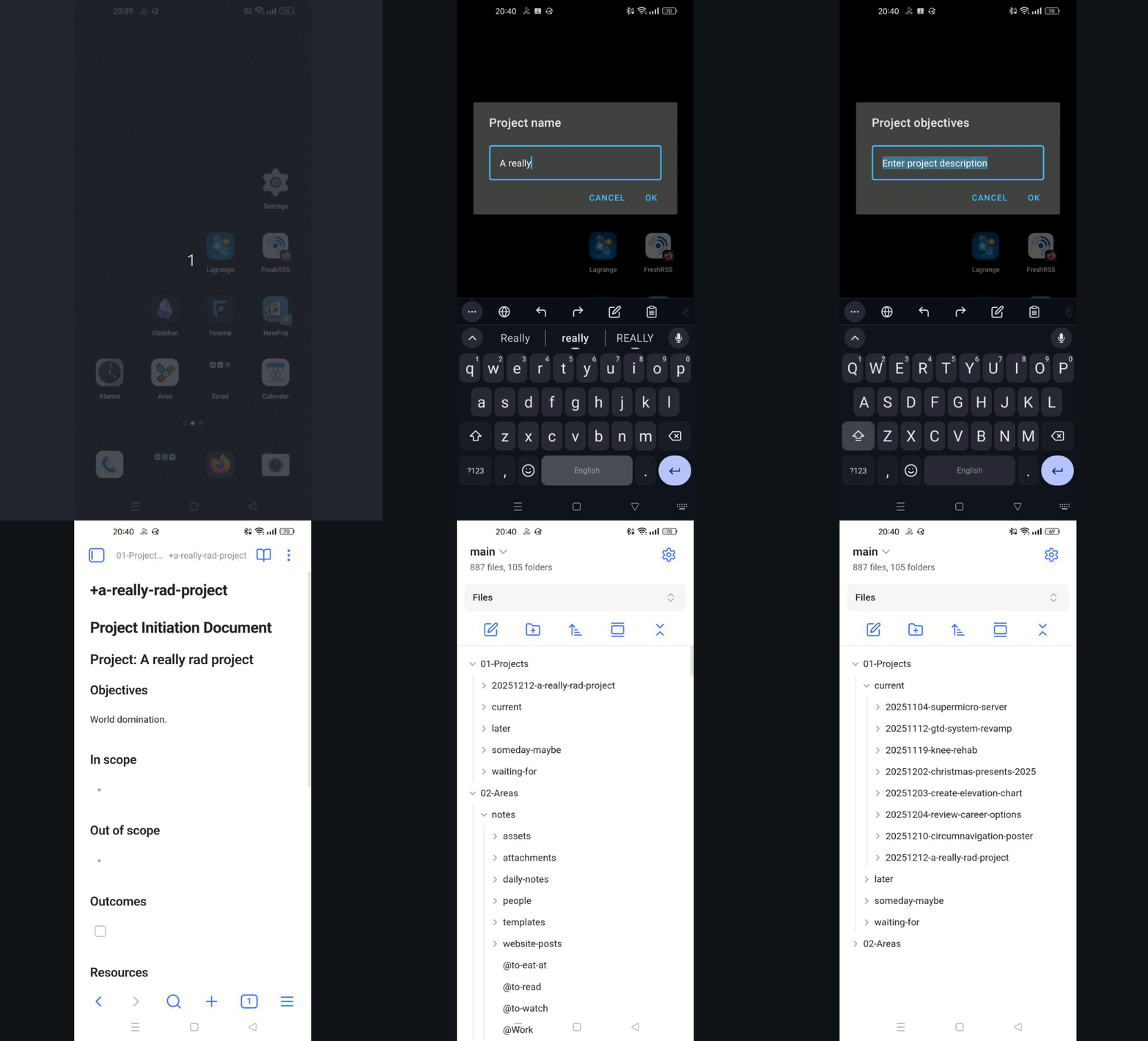
Android
Tap the "NewProj" icon on my home screen:
Laptop
Type "prj" in the terminal:
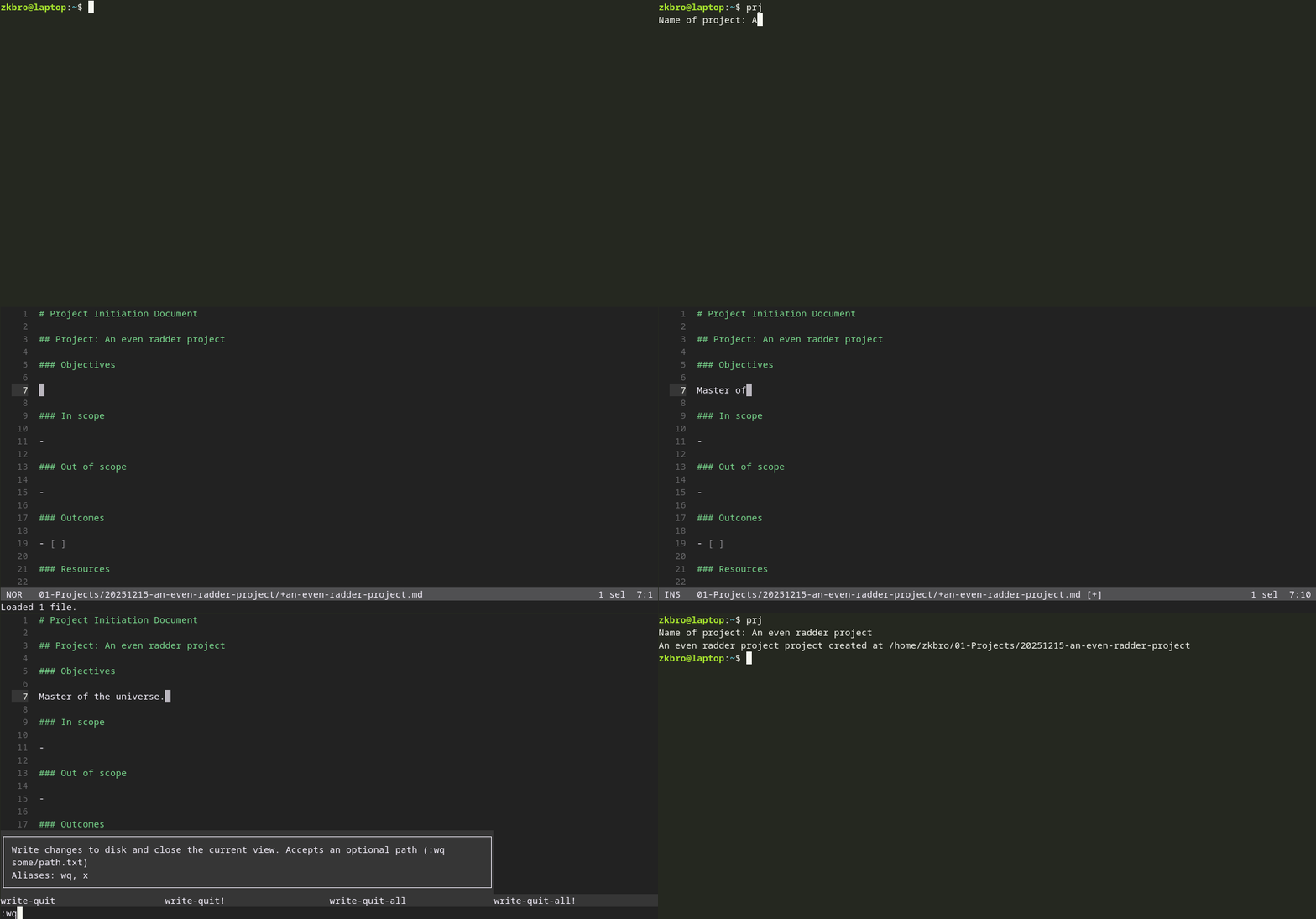
Code for both of those scripts are available here.
The PID is created in a subfolder timestamped with the date of creation. On my laptop, by creating a symlink to the projects folder from ~/02-Areas/notes/ means when I am in my todo.md file, or any file for that matter in ~/02-Areas/notes/, using the helix text-editor, and I start to reference a project by typing [[+example-project]], the marksman LSP will pick up on the +example-project.md file, meaning I can link it with TAB-completion, and quickly jump to it via the gd keys (goto definition), and return via ga (goto last accessed). Internal linking works as expected in Obsidian, though nothing to do with symlinking - I just have both of these folders synced to my vault:
├─ 01-Projects/
├─ 02-Areas/notes/
2-minute rule
If the action is going to take less than 2-minutes I will do it (yay finally actually DOING something!). I'll then tick off the item straight away. More on that later.
Waiting-for
If I have delegated, and am waiting for someone else to do it, in my todo.md file I will make sure I have tagged the @person and added the context @waiting-for, so I can stay reminded of the thing. This was VERY useful for my old job where I had lots of meetings. It could be things I'm waiting on delivery as well. Rather than clutter my email inbox with delivery status emails, I simply archive them and keep the @waiting-for item in my todo.md file until it's received. These things are "actionable" only in that I need to keep following up the status.
Defer to Calendar
Appointments go straight in the calendar. As do important things that I have set time for. Everything has to evolve around whats already in the calendar.
Lists
Some items are moved from the todo to dedicated lists:
- groceries.md
- @to-eat-at.md
- @to-read.md
- @to-watch.md
A lot of the @to's are recommended by @people, and that I first captured in a Daily Note. I'll leave that context in when I move it to my list so when I finally do the thing I can let them know and thank them for the recommendation!
I also use a to-watch YouTube playlist which is full of trailers I've saved (my one YouTube bad habit is going on a trailer binge).
Next Actions
This is it. I've either trashed, filed, delegated, done, or added something to a calendar. Everything else now lands in my todo.md file. In doing all this processing I've actually already been chipping away at my todo.md file already, as I use it as a place to capture. But lets look at how I deal with those items that haven't been dealt with just yet. This is my own version of the todo.txt format.
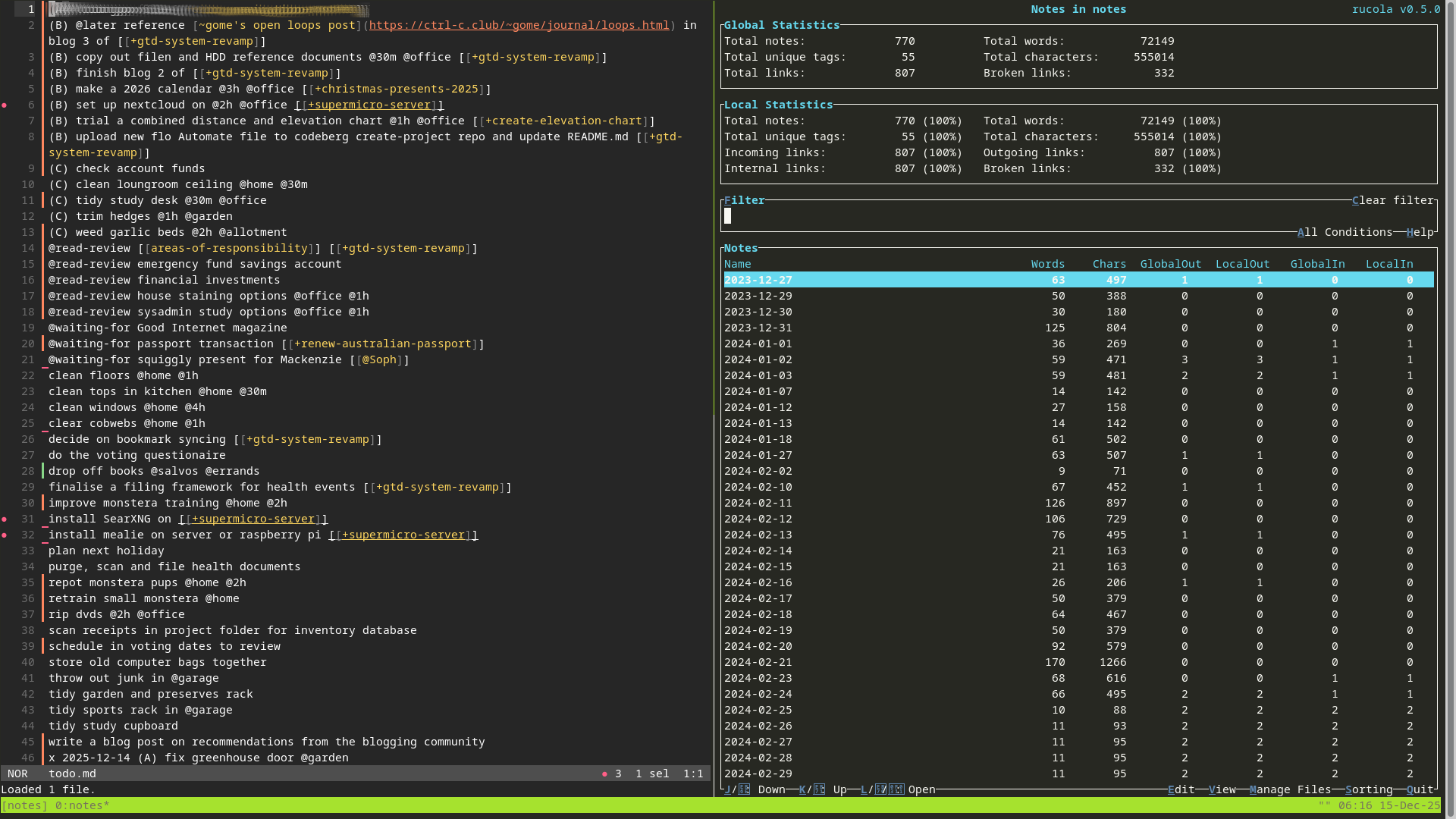
I like to add context using the "@" symbol. This makes the selecting of what to do next an almost mindless task. If I've only got @30m to spare and I'm at @home with @low energy, I can just filter appropriately and my list will tell me what to do, based on this prior processing work. This really does work! Here are some useful tags I use:
- @waiting-for something from @person (discussed above)
- @later do a task that has a dependency on a current next action
- @read-review. May result in a next action later.
- @read-respond. I've already determined that this will require a response.
- @15m @30m @1h @2h @4h durations. Helps if I know if I've only got a certain amount of time.
- @low @med @high efforts. Sometimes I'll be in the mood to tackle something difficult, othertimes not.
- @home @garden @office etc. for places. Sometimes I'll want to work in a particular area.
I use priorities (A, B, C, D etc.) like so:
- A - next actions I'll tackle today. I'll slip things up to A, during the week as I tick things off.
- B - next actions that are part of an active +project. Late in the week I have decided these are projects that require attention, so having next actions up here keeps them in sight.
- C - next actions that I've decided to do this week at some point in time.
Everything else is essentially a someday-maybe. At the end of the week they may get prioritised as part of my Weekly Review. Priorities that I didn't get around to might be de-prioritised. That's OK, because if I keep the Weekly Reviews up, it will never be forgotten about. I'll also add and remove items from the list. More on Weekly Reviews later though when I tackle the Reflection part of GTD.
I really like how I can quickly jump to project PIDs too with the internal linking and marksman setup. Very useful when doing the Weekly Review so I can focus on the project itself one by one, and jump back out to the todo list.
Complete actions
I'll mark things as complete with "x YYYY-MM-DD" but leave them in my todo until the Weekly Review where I get to appreciate the work I've done, maybe trigger new follow-up actions, and finally move them to my done.md file. All lines are sorted regularly using helix commands or Obsidian's sort & permute commands so as to not clutter the place up.
In summary
Processing for me is really the engine room of GTD. It's where a bit of thought goes into what needs to be done, and things are flicked off into the appropriate places so they're ready to be picked up at the right time. Sometimes they'll be dealt with right there (trash, 2-minute jobs).
The next big component of GTD, reflection ensures I don't get stuck in processing mode, things don't get forgotten about, new important things are added in, old unimportant things are moved out of the way. I'll tackle that in the next post.