My approach to GTD - capturing
2025-12-04 06:09
I've been a fan of Getting Things Done (GTD) for a good few years now. Read the book probably 3 or 4 times, which is the most I've ever re-read any book. I pick up on new things each time. It's great to get me back in control of my life, or at least make me feel that way. I love the tool-agnostic framework, how most of it is just plain common sense, and how it's divided into 5 areas that seem to cover all corners as long as they're all being implemented:
- Capture
- Clarify
- Organise
- Reflect
- Engage
I'm going through the ropes again. Starting from the beginning. It's amazing how quickly GTD takes affect. Stupidly easy things are progressed, others are binned. Big things are broken down into small achievable actions. Projects and areas of responsibility are given the attention they deserve.
Although GTD is tool-agnostic, it is known that it can be easy to fall into the trap of getting stuck in "Organise" and forever tweak tools to get the "perfect" system, whilst not actually achieving much. I like my tech and I like tinkering, but I like to think I've found a right balance of "simplicity, speed and fun", which David Allen encourages for organising (where the tools come into play). Right now, I tweak, but I have fun doing it. I can capture and organise fast. It is simple in operation, complex in the backend, but that is the fun bit again.
Enough jibba-jabba. I'm going to attempt to explain how my GTD system looks right now in 2025 over a number of posts. I'll cover the tools and workflow. I predominantly work digitally. It's just how I like it. It is right for me, at this moment.
First, some context.
- I use a todo.md file for all my todos. It is my own variance of the todo.txt format but in markdown which integrates better with my note-taking system.
- On my Android I use Obsidian to write and navigate my todos and notes
- On my laptop, I use helix (with marksman LSP (more on that later)
- I use the PARA method for my folder structure on my laptop - 01-Projects, 02-Areas, 03-Reference, 04-Archive
- I sync across devices with syncthing, but only my
~/01-Projectsand~/02-Areas/notesfolders. - On my laptop, I symlink
~/01-Projectsto~/02-Areas/notes/so marksman can pick up on internal linking to certain notes in helix. - I've historically left work notes and todos separate from personal notes and todos, in their own ecosystem (usually Microsoft), because I don't have as much control there. That's still the case, but it is creeping in to my personal system.
- Work is one of my GTD "Area of Responsibility", so I definitely do tackle it when I am reviewing those higher horizons, but it does not include the lower level day to do day work.
That should hopefully set the scene.
Capturing
My quickest method of capturing things like a thought or observation, or anything from a verbal conversation that could potentially be something I need to follow up on, is on my Android. I always have it on me. I open up Obsidian which defaults to today's Daily Note and I simply start tapping away. My Daily Note template looks like this:
---
weight:
---
Not much there. It is a yaml markdown file. I have weight in the frontmatter as I like to track my weight regularly. I don't always fill it out though. The file itself is stored on my phone in /vaults/main/02-Areas/notes/daily-notes/YYYY/YYYY-MM/yyyy-mm-dd.md. The whole notes folder is synced to my laptop at ~/02-Areas/notes/ via syncthing.
Capture vs note-taking
I want to differentiate between a capture and note-taking. I use the Daily Note for both. When capturing, I simply jot down the thing for later processing. The Daily Note becomes an inbox. Nothing more. The note could be a simple keyword like "potatoes", where later when I'm in processing mode, I'll clarify it as an actionable task or project to plant/harvest/whatever, then move on to organising it into the right place. On the other hand note-taking is just for my own reference related to a specific thing that I wish to track for future reference if needed. I will tag these with [[backlinks]] so I can quickly find anything related to a specific [[topic]] when needed. Here's an example:
---
weight: "79.9"
---
[[supermicro-server]] [[truenas]] [[jellyfin]]

- Changed primary DNS server to 1.1.1.1 (Cloudfare) and secondary to 1.0.0.1 (Cloudfare) in System -> Network -> Network Configuration Settings.
- Jellyfin successfully installed with default configurations.
- Added Movies and Music libraries by the two-step process - firstly creating the folders in TrueNAS shell, then adding additional storage in TrueNAS Jellyfin settings (mounted to `/media/movies` and `/media/music`) so Jellyfin recognises them.

---
[[allocate-smartly-trading-system]]

Buggered up my timing with my monthly trades again. Thanksgiving and Black Friday trading halts. I'll have to get up early on Tuesday to put my orders in. I could place my sell order, but I need that transaction to be complete so funds are available to place my buy orders.

---
Dan F Adelgatia

---
The above shows some notes specific to certain [[topics]], and a capture of the artist Dan F Adelgatia which I will later process to an actionable task to look up a discography and aquire music. I separate each note or capture via a horizontal line just for ease of reading. I have on my someday/maybe project list a project to create a script that prints these topics into a single file, where the horizontal lines will be used as the separators.
Back to capturing. If I am on my laptop, I usually have a custom tmux workspace open (opened via the tmn alias), and I open the Daily Note via the dn alias:
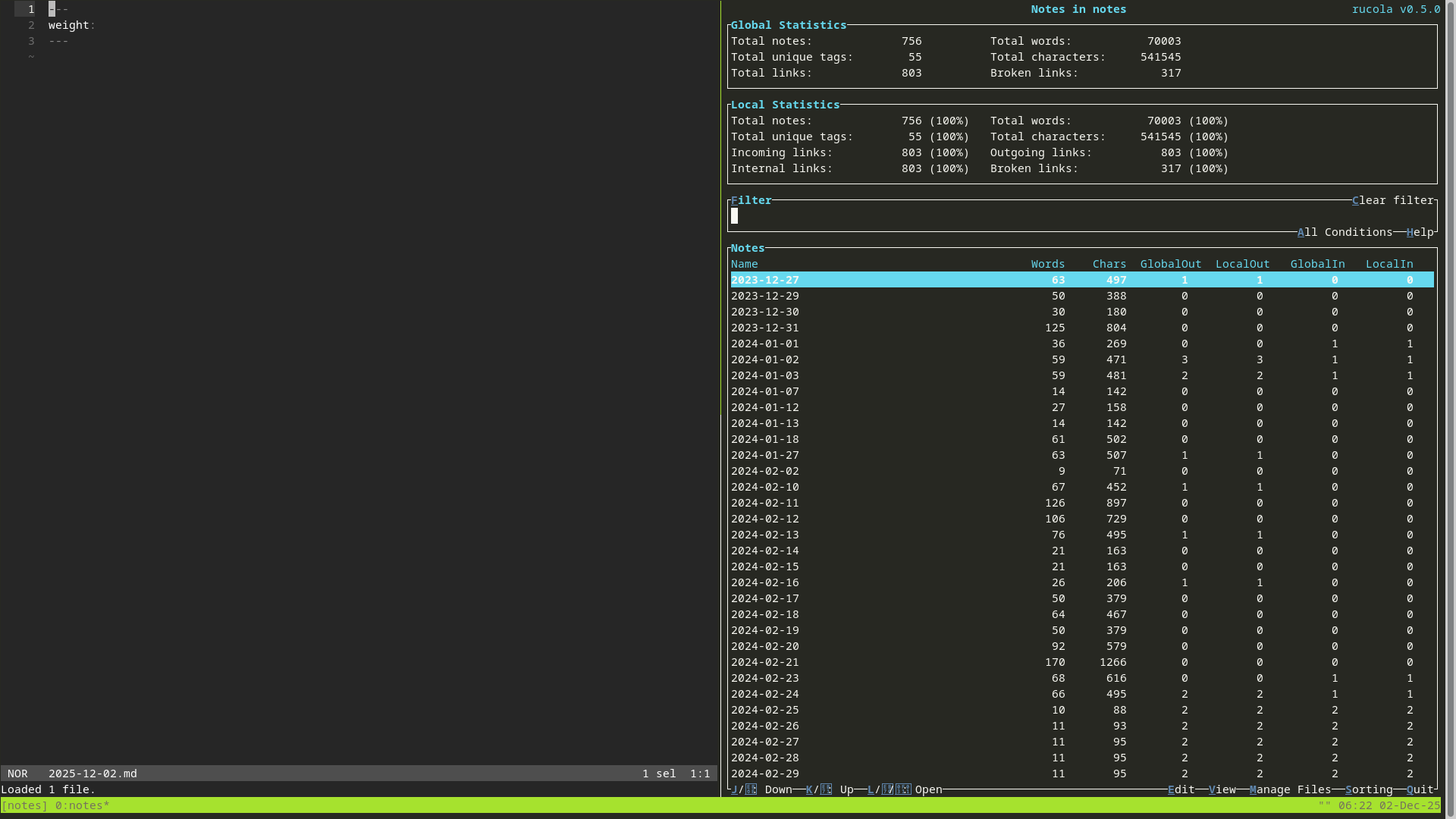
My tmn workspace has rucola open on the right pane so I can quickly explore notes if I want. This is especially useful when I'm doing nerdy things. Reconfiguring a piece of software, programming or similar.
Other capturing inboxes
There are also other places that things are captured:
Email inboxes - I'll consistently keep these empty with regular purging (a clarify and organise action). When I feel an email inbox is getting out of hand, I'll simply prioritise an action to "purge inbox" on my todo.md file.
Physical mail - I don't get this much, but if it is obviously junk, it'll go straight in the bin. Others will go on the dining table until I've determined what is happening with it. I have a project called +build-command-center on my @someday-maybe list where all my unprocessed mail will eventually land, rather than the corner of my dining table.
Text messages - I still use Messenger and WhatsApp for family, friends, recreation groups, marketplace and room rental co-ordination. SMS is used for acquaintences, service notifications, appointment confirmations, and 2FA. Messages will just sit there until I'm ready to process, unless its a 2FA or similar, which I'll use and delete immediately.
Mind sweep - Sometimes I know I've got a lot of open loops (unfinished business), that is not captured anywhere, but weighs heavily on my mind. In this case I'll set some time aside and do a mind sweep. I'll open up my todo.md and just write whatever comes to mind. I'll use the GTD book which has a few pages of prompts which will spark other things. Again just a dump of stuff later to be processesd.
In summary
I haven't actually done much here other than offloaded stuff onto my todo.md file, Daily Notes, or stuff just arriving in my inboxes (email, physical mail, text messages). Simply having a knowledge of where all these places are helps down the track for the reflect stage where I might scan all the inboxes for something that needs attention, as part of a weekly review for example.
Next up I'll get a step closer to actioning things (or not) with processing (clarifying and organising).